Usage
Overview
In its current implementation OptoBot focuses on automating and optimising colorimetric experiments. These are experiments where the experimental products can be assessed based on their measured RGB colour using a camera. For example, an experiment where red, yellow and blue liquids (e.g. food colouring) along with water are mixed to produce a pre-defined target colour. The experimental setup of such an experiment is shown below.
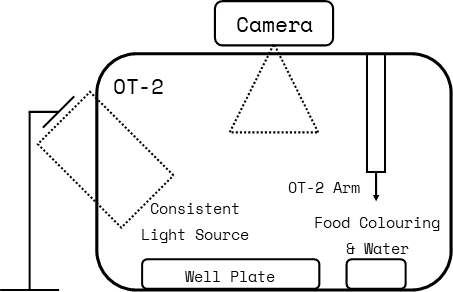
Figure: An example experimental setup for a colorimetric experiment.
OptoBot can also be used to semi-automate and optimise other experiments but manual measurements of experimental products and manual inputs are required. We aim to develop features for automating a wider range of experiments in the future.
Optimisation Algorithms
When implementing an experimental optimisation loop, OptoBot gives users the choice out of the following optimisation algorithms.
Particle Swarm Optimisation
- Bayesian Optimisation
Acquisition Function: Gaussian Process
Acquisition Function: Random Forest
Note: We plan to add more optimisation algorithms in the future.
Image Capture & Processing
In the context of colorimetric experiments, the RGB colour of experimental products need to be measured between each optimisation iteration so that experimental parameter volumes can be updated. To automate this process, OptoBot includes features for capturing an image of the OT-2’s deck using a user placed camera (e.g. phone camera or webcam) and retrieving the RGB values of wells in the image.
When an image of the OT-2’s deck is captured, OptoBot first attempts to locate the wells in the image using a contour detection algorithm and prompts the user to confirm that the wells have been located. If the wells have not been located, the user is then prompted to click on two wells in the image and OptoBot will calculate an extrapolated grid to locate the wells. The user can repeat this process until the wells in the image are located to a desired precision.
Note: We plan to continue improving the image processing algorithms in the future.
OT-2 Protocol Generation
To control the Opentrons OT-2 a custom protocol must be written and uploaded. OptoBot automates the process of generating the protocol after each iteration of optimisation. However, the user has to upload the generated protocol to the Opentrons App themselves, making this a manual step in the experimental optimisation loop.
Note: We plan to automate protocol upload to the OT-2 using SSH in the future.
Workflow
The workflow of an automated experimental optimisation loop for a colorimetric experiment using OptoBot is shown below. In the current implementation of OptoBot, there are two manual steps requiring inputs/actions from the user.
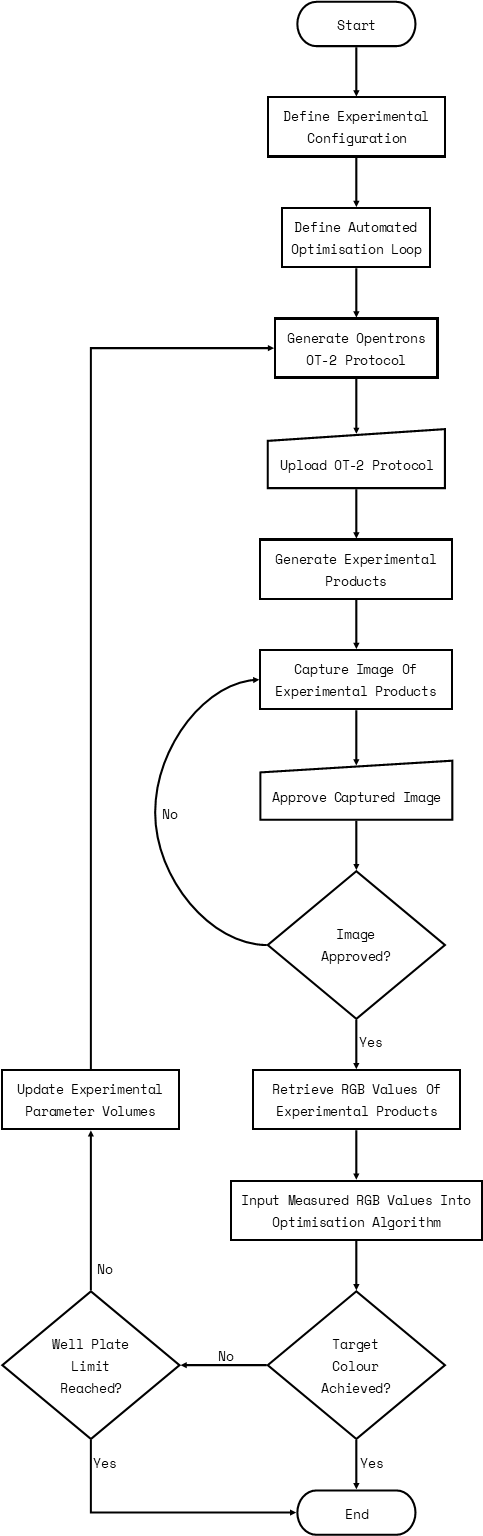
Figure: An example workflow with OptoBot for a colorimetric experiment.